
The Ultimate Guide to Crafting a Killer Capture Page on LeadsLeap
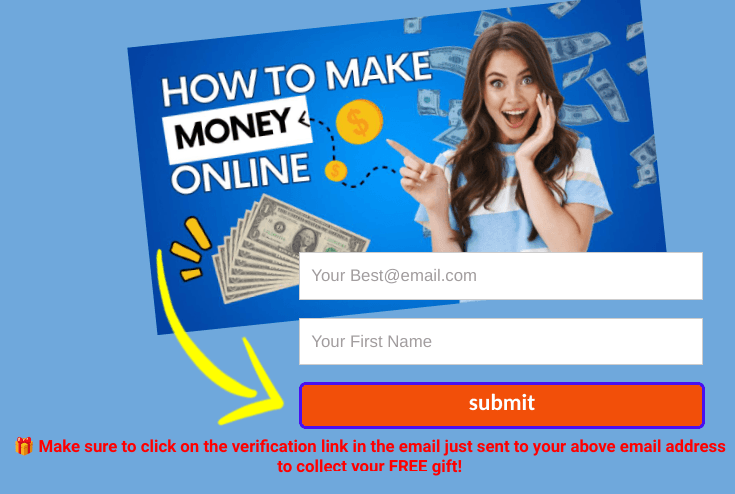
Capture Page Designed on LeadsLeap
10 Easy Steps to Crafting a Killer Capture Page on LeadsLeap …
Creating a capture page on LeadsLeap is your ticket to building a highly targeted and engaged email list, something every marketer dreams of. Forget about the cookie-cutter templates you see everywhere else — on LeadsLeap, you can create a page that not only captures emails but captivates your audience with a message that resonates deeply. Let’s dive straight into the process.
Update 12 December 2025:
I recently received a message from one of my readers that I believe is worth sharing. Here’s what Calvin has to say about LeadsLeap:
My Experience with LeadsLeap
I’ve been actively using LeadsLeap for building my affiliate funnels, running email follow-ups, and managing traffic.
What I love most is that it combines a page builder, autoresponder, and tracking system all in one platform. It saves me money because I don’t need expensive tools like GetResponse or AWeber, and it keeps every lead under my control.
I’ve successfully integrated it with my affiliate programs, captured leads, and sent automated follow-ups, all with ease. For anyone serious about affiliate marketing, this platform is a game-changer.Happy marketing!
Calvin
Step 1: Sign into Your LeadsLeap Account
Obvious, right? But let me say this: LeadsLeap is no ordinary platform. Once you’re in, you’re not just some random user — you’re a marketing beast ready to leverage their tools like a pro. Click on the “Page Builder” section from the dashboard. You’ll find it under the “Tools” tab. It’s like stepping into a world where creativity meets conversion.
Step 2: Choose Your Template or Start from Scratch
Here’s where the magic happens. LeadsLeap has a range of templates that can make your page pop. But I’ll be real — if you want to stand out, ditch the template mindset. Instead, either pick one as a base to save time, or flex those creative muscles and build your capture page from scratch. Think minimalist design, high contrast, and a killer headline. Your goal here? Command attention within three seconds, or your prospect’s gone.
Step 3: Craft an Irresistible Headline
This is where you stop them in their tracks. Don’t play it safe. Go bold, go big, or go home. Your headline should punch your visitor in the gut (metaphorically, of course) and make them feel like they need what you’re offering. For example, if you’re in the health niche, it could be something like: “Discover the Simple 5-Minute Trick to Boost Energy Instantly!” Curiosity + benefit = gold.
Step 4: Write Your Hook and Offer
Now, you’ve hooked them with the headline — time to reel them in. In a few short lines, outline what they’re getting. Your message should evoke emotion. People don’t want features; they want benefits and solutions to their problems. “Get this free guide and finally break free from the 9–5 grind.” Simple, clear, and compelling. Oh, and don’t forget to have a massive call-to-action button. Make it bright and bold — people should feel like they HAVE to click it.
Step 5: Customize the Form
Here’s where the money’s at — the form! LeadsLeap allows you to fully customize this, so make it scream: “Enter your details for something epic.” Keep it short, though. Name and email are usually enough. Add too many fields and you’ll see your conversions plummet. Less is more.
Step 6: Add Social Proof or Scarcity (Optional but POWERFUL)
If you’ve got some testimonials, splash them here. Or, if you’re offering something for a limited time (like a free eBook or consultation), throw in a countdown timer. Human psychology is funny — when we think we’re going to miss out, we tend to jump on board faster. Use this to your advantage.
Step 7: Optimize for Mobile
Here’s a cold, hard truth: Most of your traffic is coming from mobile. LeadsLeap’s editor lets you preview how your page looks on different devices. Make sure it’s seamless and smooth on phones, because if it’s clunky, you’re losing half your audience right there.
Step 8: Set Up Tracking and Testing
LeadsLeap isn’t just a page builder — it’s a data-driven beast. Make sure you set up tracking to see how your capture page is performing. LeadsLeap provides tools for this, so you can tweak and test different headlines, buttons, and offers until you hit that sweet spot of conversions.
Step 9: Publish and Share
Once your capture page is ready, hit publish and share the URL everywhere — social media, your email list, even PPC campaigns. And don’t just stop there; LeadsLeap also has its own advertising network you can tap into to drive traffic directly to your capture page.
Step 10: Follow Up Like a Boss
The beauty of a capture page isn’t just getting the email—it’s what you do next. LeadsLeap has an integrated email system and a killer autoresponder sequence in place, so make sure that you use it. Don’t just sell, sell, sell. Build trust. Offer value. By the time you pitch something, your audience should feel like they need what you’re offering.
To your wealthy future!
John 😀
Helping others make money online since 2001!
P.S. Please tell your friends and fans about this article if you liked it, and let me know what you think about it below. Thanks a lot.
The Ultimate Guide to Crafting a Killer Capture Page on LeadsLeap 🐦 10 Easy Steps to Crafting a Killer Capture Page on LeadsLeap … #WebsiteDevelopment #EmailMarketing #websitedesign Share on X
Look for the links in my bio that you might find interesting. There’s always something good there!
Many people have asked me to help them make money online since 2001! 👉 Get My Free Coaching!
About the Author of “The Ultimate Guide to Crafting a Killer Capture Page on LeadsLeap”

John, is the founder of “Living The Laptop Life”©. He has been earning online for over 20 years and built this website to help his readers avoid scams and also find genuine work-from-home opportunities.
Because of unexpected life circumstances, he left school at age 10 and became a self-taught man who seldom had a boss. His fortune was made mostly by promoting affiliate programs while traveling the world with his laptop.
He is now retired in the South of France with his wife, but he still enjoys mentoring privately at no charge:
➸ To get started, click here!
John also shares his ideas on Medium
Here are a few interesting reads from other contributors:
- Learn how to make money full-time by writing ebooks! …
- Unveiling My Top 3 Lucrative Affiliate Programs …
- Unveiling the Power of Easy Commission Funnel
- Email Marketing Mastery for Bloggers: Your Ultimate Guide!
Sponsored Ads:




To have your banner ad here, please contact me at: john@easytoretire.com”
Some Useful Links:


An email list is your most vital asset, as far as I am concerned, and I love your comment: Command attention within three seconds, or your prospect is gone. That is so true, and I wholeheartedly agree with ditching the template mindset. Your objective is to stand out from the crowd whether you are building a lead page or whether you are creating your business. Mediocrity and profit are not two words that should appear in the same sentence
Catherine, you’re absolutely spot on!
An email list is pure gold—it’s like having a direct line to your most valuable prospects. And yes, commanding attention in those first three seconds is non-negotiable. In today’s fast-paced world, people don’t have time to scroll through mediocrity. You’ve got to grab them right out of the gate!
Templates are the epitome of “blending in,” and that’s the last thing any business needs. Whether it’s a lead page, an email, or the overall business, standing out is everything. Like you said, mediocrity and profit? They don’t even belong in the same paragraph, let alone the same sentence. It’s all about being bold, being memorable, and delivering value that makes people stop and take notice.
Thanks for sharing your thoughts Catherine — it’s refreshing to see someone who gets it!
John 😊
Helping others make money since 2001: Get My FREE Training!
Hi John!
This all sounds very interesting with LeadsLeap. Is that platform something I can use with my current website where I use WordPress? Is this more for attracting leads that are looking for a business opportunity? Right now, my niche is more in entertainment and buying models and collectibles. Do you see a way LeadsLeap could work in such a niche?
It sounds exciting and I would love to bring in more traffic to my site.
– Scott
Hey Scott,
Thanks for your comment!
Yes, LeadsLeap can absolutely work with your current WordPress site. That’s what I have been doing for years.
It’s versatile and not limited to any specific niche. While a lot of people do use it for business opportunities, you can definitely use it to attract traffic to your site focused on entertainment, models, and collectibles.
LeadsLeap offers tools like traffic generation, ad widgets, and even a pop-up creator that can help drive more visitors to your site. You can showcase your collectibles or related content and get targeted traffic from people who are already interested in niche topics. It is much cheaper than WordPress, considering all the free tools that are available and more user-friendly. Plus, the help service is second to none.
It’s really about how you use the tools available to capture the attention of potential buyers or fans of your niche.
If you’re interested in increasing traffic, it might be worth experimenting with some of their features to see what works best for your site!
Hope this helps! Let me know if you have any other questions.
Cheers!
John 😊
Helping others make money since 2001: Get My FREE Training!
Hi John,
I hope this message finds you well! I recently had the opportunity to dive into your “The Ultimate Guide to Crafting a Killer Capture Page on LeadsLeap,” and I must say, it was an enlightening experience.
Your detailed breakdown of creating a captivating capture page has opened up new avenues for me to explore in my marketing efforts. The emphasis on moving away from standard templates to craft something unique and personally engaging is a game-changer. Your tips on headline creation and the psychological play of urgency have already made a significant impact on my approach.
Moreover, the mobile optimization insights were particularly impactful, given the predominant traffic from mobile users nowadays. It’s something I had overlooked in the past, and I’m excited to implement this knowledge moving forward.
Thank you for sharing such valuable insights freely. It’s not just about capturing emails but building a relationship thereafter, and your guide has equipped me with the tools to do so effectively. I’m eager to apply these strategies and see the transformations in my engagements and conversions.
Appreciate all the wisdom and looking forward to more of your invaluable guidance!
All the Best,
Eric
Hey Eric,
I’m thrilled to hear that you found the guide on “Crafting a Killer Capture Page on LeadsLeap” so valuable! It’s great that the emphasis on breaking away from standard templates resonated with you—standing out with something unique can truly make all the difference in today’s crowded digital space.
I’m especially glad the tips on headlines, urgency, and mobile optimization hit home for you. With mobile traffic dominating now, ensuring those users have a seamless experience is crucial, so you’re definitely on the right track there.
You’ve already got the mindset of building relationships rather than just collecting emails, and with these strategies, I’m confident you’ll see a big shift in your engagements and conversions.
Thanks again for your kind words! I’m excited to see how your results improve and always here if you have more questions or need further guidance.
All the best,
John 😊
Helping others make money since 2001: Get My FREE Training!