
How to write an about me page for a website is a topic that I wanted to discuss since a long time. Many of my readers have approached me on several occasions and asked me “what makes a good about me page“. So, here we are going review the 4 main qualities of a good about me page.
As you can understand, what follows is valid for a blog as well as for a website. Also, “about me” can be “about us”, or “about the company”, etc.
Okay, so let’s get on with it, shall we? …
How to write an about me page for a website ?
I guess, I should have said “How to write a GOOD about me page for a website?” right? That’s how we are going to assume it …
Did you know that the “About” page of SME (Small and Medium-sized Enterprises) websites is the 3rd most viewed page, after the home page and the contact page? Your presentation page is therefore an additional tool to help with conversion, which you should carefully optimize.
How? As said earlier, there are 4 major actions that you should consider taking for your mediocre “About Me” page becomes a GOOD one. And they are …
1. Be concise
A page of presentation is not a biography. Internet users do not have much time to devote to your page, so maximize the few seconds they are willing to spend on it.
Mention your corporate mission early on in your presentation and do it in one or two paragraphs, at most: it must be clear, concise and committed. Internet users should not have to scroll down to find out everything that is needed about you.
If you want to write more information about yourself, whether it’s your history, a short biography of your leader or a summary of your accomplishments, add links or tabs, but do not put all in your presentation!
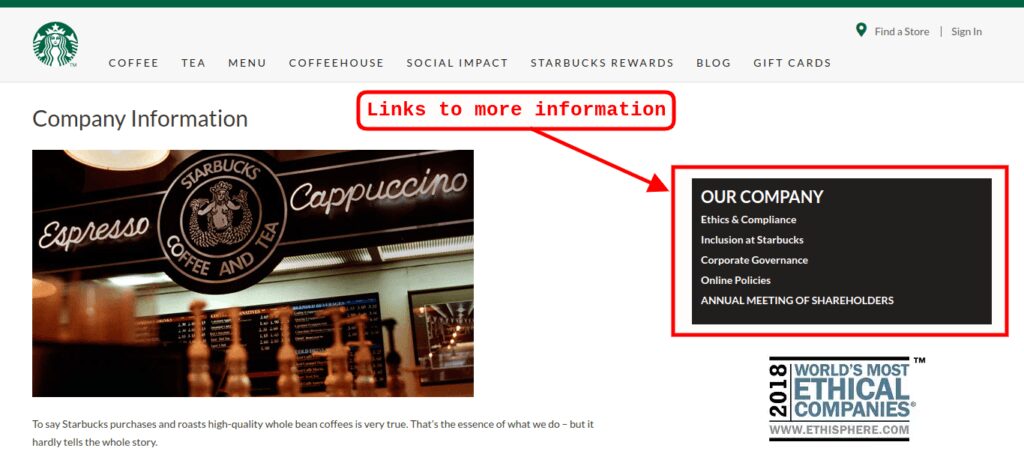
The Starbucks presentation page is an example to follow: short and well-written sentences, words that make you want to have a coffee, a photo … everything is there! Information that goes beyond the scope of the business presentation is simply grouped in a small box on the right side of the page, with easily accessible links.
2. Be dynamic
Imagine that your presentation page is the handshake that you offer to Internet users: it must be accompanied by a frank look, a smile, a firmness.
So, first of all, use action verbs. Write with the active voice (“we offer you a service” rather than “a service is offered to you”). Create images in the minds of the Internet users.

Therefore, a page of presentation without personality would miss the target. Your words, the structure of the sentences and the words chosen must reflect who you are.
A dentist, for example, must have a professional image that inspires confidence. On the other hand, a young startup that works in the field of fashion articles should rather make original remarks that inspire a fresh wind.
3. Refine your page layout
It’s not just the words: there is also the look. The visuals on your page should reflect who you are.
Put pictures or images to make reading more enjoyable. Include a video presentation, if you have the means to do so professionally. If you can’t produce a professional video yourself, you can hire the services of some freelancers, like on Fiverr. You will find there some really good professionals who will deliver some great videos.
Clean up the style: anything that annoys the eye or distracts the user’s attention should be removed. However, it may be useful to focus on certain parts of your page by using headings, different font sizes, and bold or italic characters.
4. Make a call to action
How often do I have to repeat this? That’s right, I have even written an article on this most important subject. Most new comers to online marketing seem to be afraid to place calls to action (CTA) all through their articles and various places. If you are one of them, or even if you are not sure, I suggest that you take a moment to read: “How To Call To Action On A Website“.
Take advantage of your introductory page to ask people to join your newsletter by agreeing to provide you with their email address, for example. As many people are viewing this page, you should take the opportunity to expand your audience.
It can also be beneficial to add a link that redirects your users directly to your contact page: they will not have to search through the tabs since you will put your details on a silver platter!
Here is an example of a strong call to action:
I invite you to get my free Internet Marketing course by clicking on the banner below …
Conclusion
To put some effort into the development of your “About Me” page is necessary: this page is a wonderful tool to help you with your conversion.
Inspire trust to the user who is meeting you for the first time. This is the image that you must release during this virtual meeting that will encourage him or her to contact you.
And here are some articles that you will also find useful:
- How To Build An Effective Landing Page
- How To Create A Niche Website ?
- Tips For Creating Quality Content
Thanks for reading

John
I hope that you now understand how to write an about me page for a website. Pretty simple right? If you have any other tips in this particular field, my readers and myself would like to hear from you. And, should you have any problems and would like to find a solution, please make use of the box below and someone and/or myself. I will respond typically within 24 to 48 hours. If you enjoyed reading this article please share it socially and post your appreciation in the comments area below, I will highly appreciate it!
I am a Premium Member at Wealthy Affiliate, where I learned how to share my passions and successes. You are most welcome to join my team and learn how to become successful in business and retire early. I will personally mentor you for FREE. It is 100% FREE to join, learn and earn! Click the button below and I’ll see you on the other side.
 Easy to Retire – Copyright © since 2017 to date!
Hi John,
This is a question I have had since I first began this whole website building process. My own “About Me” page – for a first run – may not be too bad but I also realize there is much room for improvement. I read other’s “About Me” page and think, “That’s what I should have written for mine!”.
I like the idea of adding video, something I never thought of for an “About Me” page. If nothing else, it may encourage the reader to read the entire page from top to bottom.
Adding a call to action phrase is another item I have never felt important to add to an “About Me” page.
I am always learning something new.
Have you noticed an increase in responses with a call to action phrase included in your “About Me” page?
Thanks very much for visiting my website and for taking the time to comment on my “How To Write An About Me Page For A Website?” blog post Susan.
As you have read, the about me page is the 3rd most viewed page, after the home page and the contact page! It’s amazing isn’t it? I didn’t know that myself until I have done some research for this article.
So, if you have visited my “About Me” page, don’t take it as a good example yet, I have some work to do on it which I will soon take care of, as I am doing a complete revamping of my website at the moment.
As for including a call to action (CTA), yes, this is a must. As a matter of fact, I have written an article not too long ago on the subject, which you can access here ~~> “How To Call To Action On A Website” I am sure that you will find it very useful.
If you have any questions, please make sure to post them here and you be assured to have a response within 24 and 48 hours.
I wish you the very best,
John
Hey John!
I think this is the most important lessons for everyone who wants to blog or sell through a website. Nobody really cares about the product or how good the website is if you don’t have a story or at least a good story. I heard a quote not long ago. Facts tell and story sells. This made me think twice before having the wrong focus
Hi Stein,
Nice seeing you here again. I am glad that you are enjoying my articles. I hope that they bring you the information you are looking for and I hope that you have signed up for my newsletter (top right column of every page and blog posts).
Long ago, in my early days of marketing online and off line, I learned that people are not buying a product or service for what it is, or for the price, but mostly because of how well you present it. Also, they will not join a money making opportunity for the company you are representing but for you. Which means that it is very important that you sell yourself rather than the product or the company. This is where your “About Me” page becomes very important and great care should be applied to it.
Which can be resumed in what you are sharing Stein: “Facts tell and story sells.”. Very true!
I wish you the very best.
John