
Today we are going to review in details the various features of the Jarvee software and how you can automate your Instagram account with it.
Before starting, here is the link to test Jarvee for free for 5 days for those of you who are interested ~~> Jarvee
But if you are not really interested, at least before you go, you might like to join my free Internet Marketing course (provided it is still open for subscription). So, check it out now by clicking on the image below …

Well, as you are still here, let us get on with our …
Jarvee and Instagram Review …
In this review I am going to go through the following topic …
- Introduction
- What is Jarvee?
- How does Jarvee work?
- What I like about Jarvee?
- What I don’t like about Jarvee?
- My Verdict
1 – Introduction
Jarvee is a social media bot (short for software robot) which permits to automate a lot of actions all under one roof. What makes Jarvee so popular is the price and the number of social media accounts that you can operate.
The advantage of Jarvee is its very low price if you have several accounts to automate. Also, it has a very large number of features for 7 different social networks.
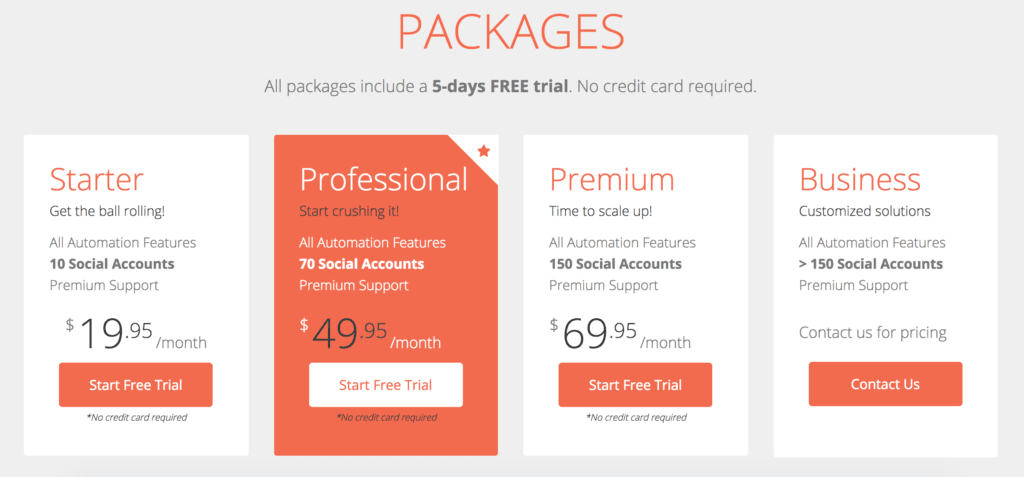
For example, the smaller package (Starter) which costs only $19,95 a month will allow you to activate all the features on up to 10 social networks.
Then, the larger package (Premium) will let you use all the features on up to 150 social accounts for $69,95 per month.
Also, you can try any of the packages for 5 days for free. No credit card details are asked to start the trial period.
There is also a “Business” package available if you wish to automate more than 150 social accounts. The cost for this one is negotiable.
Here below is the cost of the different plans …
So yes, Jarvee is not only for Instagram, but it works as well with your Twitter, Facebook, Pinterest, LinkedIn, Youtube and Tumblr accounts. Therefore, it makes Jarvee quite an attractive social media bot pricewise.
2 – What is Jarvee?
For this review, we are only going to talk about automating your Instagram account with Jarvee. It will be more or less the same for all the other social accounts, so there no point going through each other social platforms individually.
But if you have any question on another account, please make sure to ask your questions at the bottom of this review and I will make sure to answer you within 48 hours.
Also, all along this blog post, I will show you each features one by one. The image below shows all the functions that you will see when you are on your Jarvee’s account …

I recommend that you spare a few minutes to watch this video so that you will understand the rest better …
Meanwhile, do you want to take advantage of the 5 day free trial? … Click here!
Note: You might be wondering if Jarvee has an Affiliate Program, right? As an Affiliate Marketer myself since 2001, it is the first thing that I search for when it comes to programs, apps, etc. that has a good reputation. But I hate to disappoint you, Jarvee’s Affiliate Program has been suspended and I do not know the reasons why, nor if it will be reactivated any time soon, or if ever.
But, if you are interested in a solid Affiliate Program, that is the number ONE as far as I am concerned, I recommend that you have a look at what I am doing to make a living out of.
You won’t be disappointed as it is totally free to join, learn and make money at the same time.
3 – How does Jarvee work?
With Jarvee you can literally program hundreds of automated operations. Just set it up correctly and let it do the job for you. The most accurately it is set, the closer your target audience will be responsive.
As I said earlier, I am only concentrating on the Instagram part of Jarvee for this review, but it will just about the same for all the other social platforms that Jarvee supports.
Jarvee’s various functions
Follow
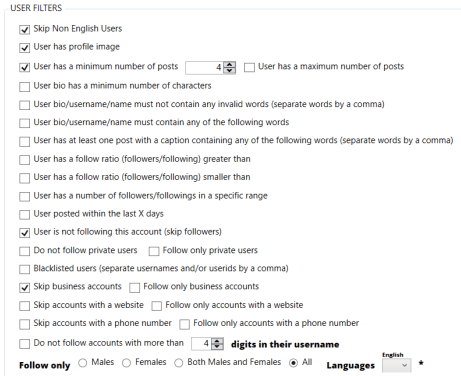
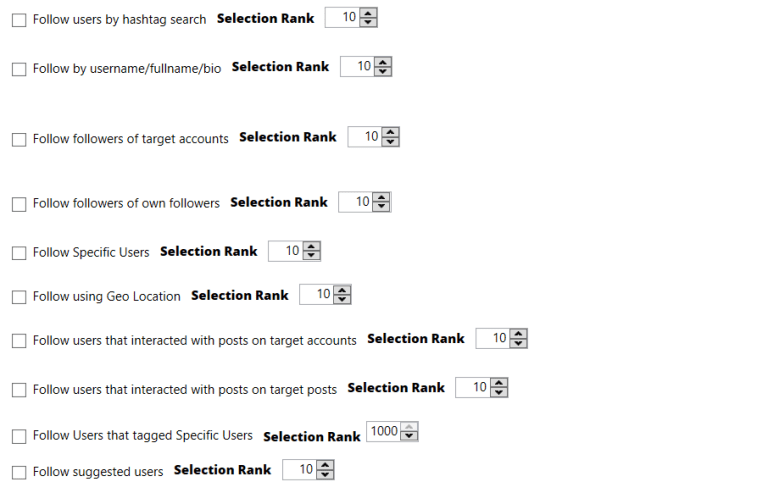
This is surely the most useful and used option which allows you to track people automatically based on filter and source. For example: follow the followers of a competitor to try to recover his customers. See the screenshot below …
Follow Back
It is what it means … that is to say, to Follow Back people who have followed you according to your pre-set filters.
Unfollow
On the other hand, Unfollow is used to remove followers that you don’t want to have in your followers’ list.
Like
This tool, as most of us know, allows you to automatically like posts, be it yours, those of your followers or the followers of a competitor. And also by hashtag.
Comment
It works about the same way as the like tool except that it allows you to leave comments on posts.
Contact
The contact function gives you the possibility to send pre written messages to each new follower. (Also called Direct Messages) But also to automatically reply to received messages and to send them at any time.

Direct Messages
This function makes it possible to view the private messages received and to be able to answer them directly from this window.
Manage Comments
This one will manage the comments received on your posts. To answer, or to delete.
Delete Posts
As for the Delete Posts function, it is a tool for simply deleting posts in just one click.
Delete Comments
As simple as Delete Posts, Delete Comments will delete the comments that you don’t like to see, as per your prefixed filters, such as spam messages, rude comments, etc.
Block Followers
If you have been online for a while, you will know that there are some very strange people on the world wide web, and especially on the social media, who are taking pleasure in spending their time being nasty to other users. As well as those who are repeatedly posting offers and won’t take no for an answer.
In other words, you can simply block these followers with this function.
Repost
Repost is one of my favorite tools, it allows to repost the contents of other accounts automatically. It is the same as the reTweet or RT of Twitter.
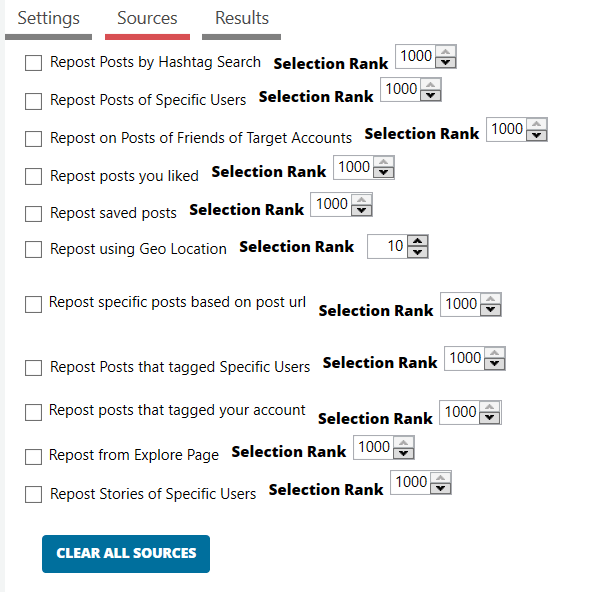
There is a multitude of options for Repost such as, you can edit the text of the publication with your hashtags, your description and use the spin syntax. Excellent! (see image below).
Users And Hashtags
It is a tool designed to find people based on keywords, their username if known, with hashtags (#).
Like Comments
This tool will automatically like the comments you want, it can be yours, your followers, hashtags, or the followers of a targeted account.
Save Posts
This function will allow you to save posts that you wish to keep.
Story Viewer
Story Viewer capability will keep an eye on the stories of your followers or other users. If the person who posted the story sees your username among the people who viewed his story, chances are that he will come to visit your profile and follow you, or interact with you.
Full Browser Experience
This tool is one of the most useful of all as it allows to simulate an activity on the web by visiting web pages, to make you look like a human and not a bot (software robot).
We know that since social media have become extremely popular among marketer, hundreds of bots have been created in order to save time posting messages.
Because of that, social marketers make great use of bots making the messages posted impersonal. Which means that a message posted by a bot is in fact not read by a person, therefore useless!
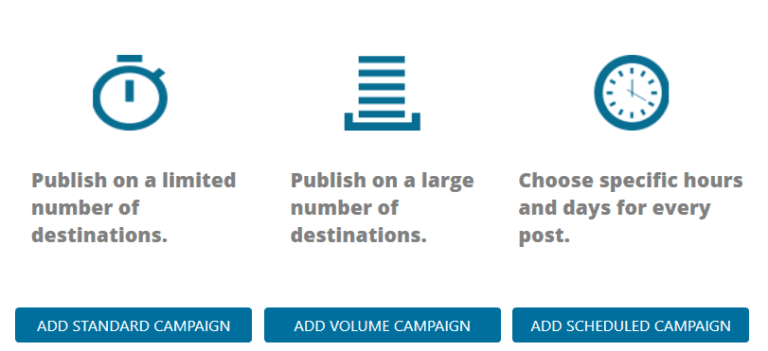
Campaigns
And finally, one of the most useful tools which allows you to schedule publications anytime and to publish them automatically.
You can import over a hundred publications and use Spin Syntax to make unique descriptions automatically.
4 – What I like about Jarvee?
Being a great fan of automation myself, I greatly appreciate that Jarvee makes it possible to automate absolutely everything on your Instagram account as well as other social platforms.
Its price is the cheapest on the market considering the number of capabilities it offers, and the number of social media accounts that it can work with.
The cost of the “Starter” package alone makes it very attractive ($29.95 a month). Plus, the 5 days trial period without having to give out your payment details shows that Jarvee is confident in their product.
5 – What I don’t like about Jarvee?
As you have read this review all the way to here, you know that there is not much that I don’t like about Jarvee for Instagram. Apart for one thing …
A bot remains a bot, and as to this date, it doesn’t replace the human touch.
Another thing that I know by experience is that social media don’t like bots and they are very much capable of detecting them. As I said earlier that I am a great believer in automating tasks that can be. I do use bots for that, which has recently resulted in having two of my Twitter accounts suspended.
Although, Jarvee has ways to “fool” social media with their unique “Full Browser Experience” function, social media are getting better and better at detecting bots, so beware.
Here is a comment I came across during my research that supports my above statement …
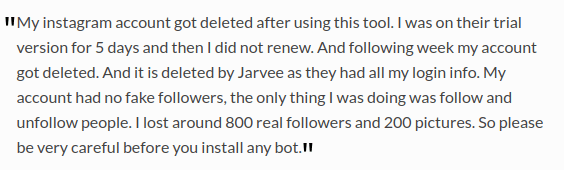
To be fair, it may not be the only reason why this user’s account was deleted, but who knows. And I guess that it is like everything in life, and not only online, you need to make use of Jarvee responsibly.
A couple more drawbacks about Jarvee:
- It works its magic only when your computer is running, which means that it will work 24/7 as they claim, but only if you are online 24/7, unless your machine is in sleep mode.
- It only works on the Windows Operating System. A bit of a bummer for me as I use a Chromebook OS.
6 – Jarvee and Instagram review – My Verdict

Apart for a few cons listed above, I can honestly say that Jarvee is one of the best bots available online at the moment.
Its price and huge numbers of features makes it to be the most desirable bot.
Jarvee will definitely help you grow your business through the automation of many of the tasks that it can perform on your social media.
It will save you hours of your precious time, unabling you to do other things that a bot cannot do (yet), or that you prefer to do yourself.
Thanks for reading my review on Jarvee and Instagram …

I hope that you enjoyed reading this Jarvee and Instagram review. Now it is up to you to decide whether you will find it useful.
If you are already using this program and have any tips to share with us, we’d like to hear about it.
And, if you have any questions, please use the comments’ area below. You should normally receive a reply within the next 48 hours.
If you enjoyed reading this article, please share it socially. Also post a comment with us here below, I will be very grateful!
As a Premium Member at Wealthy Affiliate, I learned how to share my passions with the world. You are very welcome to become part of my team of very successful netpreneurs. You too can become a successful business owner and live your laptop life. I will be your personal mentor for FREE. It is 100% FREE to join, learn and earn! Click the button below and let’s …

Hi John, this introduction to Jarvee comes at a time when I find that my social media activity takes up a lot of time. I spend time on facebook, and I have other accounts Linked In , Instagram and Twitter which I hardly ever use because i am busy doing other duties. I am going to be looking into the possibility of Jarvee as a try out, especially since they don’t ask for payment information during the trial. Will it work if I already have accounts on these platforms ?
Thanks for your comment and question JJ. Yes, it will work as in fact you will be asked to link your existing social accounts with Jarvee during your setup process.
Let me know if you have any other questions.
Best wishes,
John
Hi!
I’m happy to see this product passes as legitimate, but I don’t use automated systems for my social media accounts because they’re against the rules of most. Plus automation is kind of obvious when you use a bot.
I do automate some things, like posting to my Instagram and other social media accounts at the same time, or scheduling my posts with a good social media scheduler, or posting blog posts on social media through IFTTT, and I am going to create some automated messages to respond to messages from people until I can get back to them, but in general, I believe it’s best to be authentic as you can get your accounts shut down if you use bots.
It does grow your social media following, but not in an authentic way, which is why I’ll pass on this product. Plus their affiliate program being suspending is suspicious.
Thanks for the review though!
Very wise Selenity. Thanks for having joined my mailing list, so that you do not miss any of my posts. Your comments are always very much appreciated.
I agree with you, bots are really not the best way to do business. Although we all know that many things we see online these days are automated, but there are some that don’t matter, such as automated emails, but there are some that are rather annoying.
You must have received a notification to let you know that I have just written a very interesting post ~~> “How Do I Create a Landing Page for My Website?“.
I hope you like it and my readers would like to know what you think of it.
Best wishes,
John
I’ve been looking for software like this but not for Instagram use but rather for Twitter use. The previous software that I’ve been using in Twitter, the Crowdfireapp, recently changed its core business, it’s no longer a tool for figuring out who followed you recently and who you have to unfollow but rather, a tool for automating tweets now (content curation). Can I use this Jarvee for Twitter?
Hi Gomer,
Thanks for your comments and question. I used to use Crowdfire for a very long time, it was excellent, until Twitter changed its regulations and I didn’t find Crowdfire very useful anymore.
Jarvee is the new thing now and so far it seems to be alright, and the price is very much affordable. I won’t be surprised that some time soon they will bring their fees up as they are becoming more and more popular.
To answer your question Gomer, as I mentioned in the introduction of my blog post, Jarvee also works for the Twitter, Facebook, Pinterest, LinkedIn, Youtube and Tumblr accounts. I used Instagram as an example in order to simplify my review, but the process is basically the same for the other social platforms.
I wish you the very best,
John
I’ve been reading about all kinds of social media automation, and Jarvee sounds like a real ringer. For one, I love the fact you can test-drive the product for five days without giving away payment information. You just don’t see this often, but it shows the confidence they have, as you mentioned. I also think the price is fair, and for up to ten social media accounts, I’d definitely be down to buy this, especially since it’s more than just Instagram, another plus.
Hi Todd,
I am glad that my review on Jarvee and Instagram pleased you and will help you make the decision to buy the product taking advantage of the 5 days free trial. As you say, it shows that the owners are confident in the quality of their product. However, personally, I feel that 5 days is a bit short to really appreciate the full power of Jarvee, but I guess that just by reading the positive reviews surrounding the product should be enough to convince people who are looking for such software.
I wish you the very best Todd.
By the way, have you had the time to read my last review on this wonderful tool called Hello Bar? ~~> “What is Hello Bar for?“. I hope you will and I am looking forward to your comments on that, okay?
Cheers,
John
Hello John, I must say that this article is very helpful and informative. I did not hear about Jarvee so far but I think it is worth it. It can be risky as you say social media and Google are getting smarter with each passing day but online business is also risky so we can’t know does it work if we don’t try.
Thanks very much for your comments regarding my review on Jarvee and Instagram Daniel. I am glad that you enjoyed it and got something out of it.
Let me know of you have any questions about it.
For info: I have posted a couple more articles since, I am sure that you will like them:
– How Do I Create a Landing Page for My Website?
– What is Hello Bar for?
Let me know what you think.
Best wishes,
John
Hey John, thanks for a great review on Jarvee. I was told about this social media program but the person never described it fully to me. So I am happy I got to read this and here are my thoughts..
But first I would like to ask a somewhat related question. I have social media accounts with most networks and the only one I do not have is Instagram. Do you have any training on your website about how to use Instagram?
As for Jarvee it sounds pretty robust in all of the things it will do for you. The low price is attractive in comparison to what a social media manager would cost. Having Jarvee be my virtual manager is quite appealing.
The only thing I was concerned with while reading through your review, you truthfully answered. Seeing how Jarvee is a bot, caution would need to be given since some social networks do not like bots at all. I will just have to proceed with caution.
Thanks so much for reading my review on Jarvee and Instagram Robert. I am glad that it was useful to you. I haven’t written anything yet on how to use Instagram per say as there is so much stuff already available online, apart from “How to Upload a Video on Instagram” that might interest you.
As you say Robert, bots are to be used wisely, as a bot, no matter how sophisticated it is, remains a bot, and Google hates them and is getting better and better in detecting them.
I wish you the very best and I look forward to seeing you again soon on my next blog post.
John