
How to find duplicate content on your website may be a title that will surprise you. That’s right, a few days ago, while wondering why my articles were not ranking as they used to, I carried on with a complete scan of my website with a cool tool: Siteliner, and I was horrified to discover that I had over 250 duplicate pages and instances on my website, and not just a few words or sentences, but complete pages, can you believe it?
Me? Duplicate content? Not possible!
I write all my articles myself and to make absolutely sure that not a sentence or expression is accidentally textually identical to the work of other bloggers, I submit them to Copyscape (another cool tool).
So, how you can imagine, I was in a complete panic !
I immediately contacted a couple of my mentors who very quickly examined the situation and provided me with possible causes and solutions. So, this is what I am going to share with you today …
How to find duplicate content on your website, and how to fix it
Duplicate content affects 25 to 30% of all text on the Internet according to Matt Cutts (the manager of Google Webspam).
First of all let us clarify something about duplicate content: it is largely, and somehow wrongly, believed that Google systematically penalizes websites and blogs for duplicate content. And that search engines, and mainly Google, hate “duplicate content” and can cause a penalty for your site!
So far this has not been proven, and even Google denies that.
Neil Patel, who is regarded as being one of the top influencers on the web, recorded an interview with Adam from https://viewership.com. I recommend that you watch it as it is a great eyeopener …
However, if you want to improve your SEO, it is still better that you make sure that you are not affected by this problem!
So, let’s get on with it, shall we?
1. Duplicate content, what is it?
As the name suggests, it is neither more nor less than the presence of the same content on several pages of the web.
This can be the same text with some modified words or just the same text copied / pasted word for word. Whether in a paragraph or a whole page, Google sees everything and wants UNIQUE content! 😉
The pages in question may belong to one and the same site, but they may also concern different sites. But, whether duplicate content is an internal or external problem, it needs to be solved!
Because the duplicate content risks:
- to penalize your page (although, as we have seen, it is not proven). This translates concretely into the downgrading of the page copied into the search engine results. And, in the end, it is your entire site that Google might penalize! This is what I think happened to me.
NB: If it is plagiarism, Google looks at certain criteria such as the date of publication or the author of the publication to determine the original page.
- or that your duplicate page is not directly taken into account by Google! For non-malicious content, Google chooses by itself to index only one of the pages in duplicate. So make sure it chooses the right one … YOURS of course!
And we will see how …
In general, most of the duplicate contents are involuntarily duplicated content, even within our own site, and we may not even aware of it!
So, it is worth doing a little check-up!
2. What are the things to watch for on your website or blog?
1. The urls of your site
– Your home page with or without www?
The first thing you need to make sure is a typical case of duplicate content without you knowing it:
You can access your site through 2 different URLs:
http://yourdomainname.com and http://www.yourdomainname.com
The same content is therefore found under two different urls ~~> duplicate content!
Make sure that the address http://www.yourdomainname.com redirects well to the address http://yourdomainname.com (via a 301 redirect).
To do this, type the address http://www.yourdomainname.com in the Browseo browser. This one will tell you the 301 redirect like this:
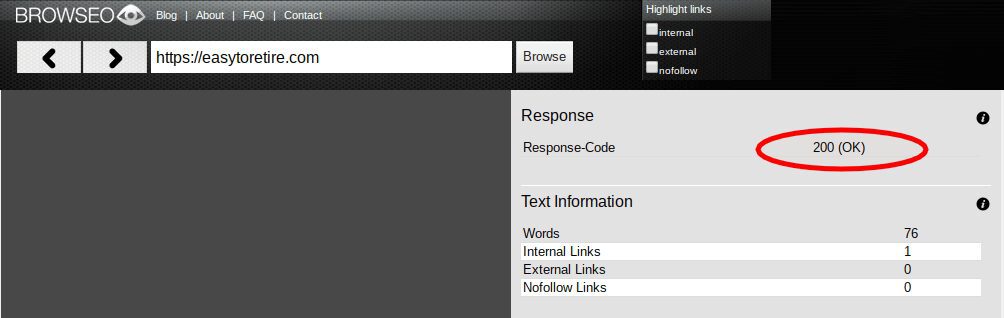
If it’s “200 (OK)”, it’s perfect!
If this is not the case, you should establish permanent redirection (301) through the .htaccess file of your site (what the **** is this?). Or ask your webmaster to do it for you ;). You can also do the redirection via your server, but in this case, you must ask your host!
– Several domain names
Can you buy multiple domain names for your site? Several domains with different extensions (.com, .net, etc.) to make sure that all possible variations of your domain name belong to you? Of course you can, and it is a common practice.
In the same way, it is important to choose the main domain name on which you want to work and then make a permanent redirection (redirection 301) of your other domain names to it.
Time to take a break, and in the main time …

Okay, ready to continue? …
2. The pages of your site
– Your guest articles
Be sure that the same guest article is not already available several times on different sites! For example, in the case of a guest article that you wrote on another blog and that you also publish at home! For guest articles that you write to other bloggers, do not copy the article on your own blog. If you want to talk about it with your readers, you can explain that you wrote on this blog by including a small introduction (unique and not also on the guest article) and put a link to the original article.
– Your own articles

In the same way, pay attention to your own articles:
And in particular to the archive pages or categories of your blog, which repeat your already published articles. Articles that appear both in their own url, archives, category pages or keywords are considered duplicates!
Take for example of one of my articles: How To Optimize Images For Your Website
Its original address is: https://easytoretire.com/how-to-optimize-images-for-your-website
If we classify it in the category “social networks”, another address is automatically created which refers to the same content: https://easytoretire.com/social-networks/how-to-optimize-images-for-your-website
Then, you might have archived pages that rank your articles in order of publication month. You can also automatically find the same article at the following address: https://easytoretire.com/august-2018/how-to-optimize-images-for-your-website
Finally, in case you have associated your article with keywords, for each keyword, a new address is created: https://easytoretire.com/optimize-images/how-to-optimize-images-for-your-website
Which means?
In short, we would not have less than 4 different urls for the same article! So be sure to put snippets of your articles (rather than entire articles) in your archive pages, categories and keywords (tags) … but also in your RSS feed and on your Home page!
NB: For your RSS feed, once on your WordPress account, go to the left menu on “Settings” then “Reading“. Make sure you have checked the box “Summary” for the line “For each article in a feed, show“.
An error often also happens when you register on directories or sites of releases, making a copy / paste of the description of your site or release.
Anyway, to find out which of your current pages are affected by duplicate content, you can use Copyscape, which locates pages that have content similar to yours.
As mentioned earlier, this other tool from Siteliner will allow you to know much more about duplicate content on or off your website or blog, if you have any.
3. How to prevent the presence of duplicate content?

There are different ways to avoid the penalty of having duplicate content on your site, but the easiest way is to not index duplicate content!
How?
Simply tell Google which pages you do not want them to consider (the ones you consider to be duplicate content). For that, you have 2 options:
- create a robots.txt file
- insert a “noindex” tag on your duplicate pages!
NB: To put a page in “noindex”, it’s very easy. In just 2 clicks if you are using the Yoast SEO plugin.
Here we are ! With all this, you will have removed all suspicions of duplicate content from Google! By eliminating the similarities in the results, you will strengthen the weight of the remaining pages and improve your SEO 😉
But again, as I said at the beginning, don’t stress too much over Google penalizing your website or blog because of duplicate content. Do your best to write great and unique content. Eliminate “duplicate content” as much as you can, by following my suggestions above … and continue doing your best.
And, to further your knowledge, here are some articles that you will also find useful:
- How To Get Ranked By Google – A Beginner’s Guide
- How To Boost YouTube Views For Free
- What Is The Best Home Based Business For Stay At Home Moms
Also, I invite you to get my free Internet Marketing course by clicking on the banner below …
Thanks for reading

John
I hope this article clearly showed how to find duplicate content on your website, and how to eliminate them as much as possible. Pretty simple right? If you have any other tips in this particular field, my readers and myself would like to hear from you. And, should you have any problems and would like to find a solution, please make use of the box below and someone and/or myself. I will respond typically within 24 to 48 hours. If you enjoyed reading this article please share it socially and post your appreciation in the comments area below, I will highly appreciate it!
I am a Premium Member at Wealthy Affiliate, where I learned how to share my passions and successes. You are most welcome to join my team and learn how to become successful in business and retire early. I will personally mentor you for FREE. It is 100% FREE to join, learn and earn! Click the button below and I’ll see you on the other side.

Easy to Retire – Copyright © since 2017 to date!
Duplicate content like you said is very common. Once your blog/website starts attracting a large amount of traffic some people will start copying it. It will happen sooner or later. But Google today is smart enough to know when is done by accident or if someone is stealing your content. You can always file a DMCA takedown notice (as a last resort). If you could also share a few information on that it would be great.
I also use Copyscape but i didn’t know about the Siteliner tool. Great tool. Thank you for that.
Thanks for your comments Nikos and I am glad that my “How To Find Duplicate Content On Your Website” blog post help you discover the Siteliner tool.
Fortunately, I never had to file a DMCA Takedown Notice, but for those who are interested to know, it seems to be a quite simple procedure. Simply type in “How do I send a DMCA takedown notice?” in your browser and you will find all the details.
As you say Nikos, it should be done as a last resort, after you have contacted the website owner to ask him/her to rewrite their article.
There are also other actions that your webmaster can to to let Google know that you were the original writer of this content. Also, fortunately Google is good at recognising which content was first uploaded.
I wish you the very best Nikos,
John
Interesting. I always heard the nightmare of having someone copy your work. I check my website on BrowSEO but I didn’t get Respond-Code as 200 (OK). What does that mean? and how would I fixed it? And how do I find out if any of my contents is copied? Thanks
Hi Sophorn,
Nice seeing you here again and for your comments on my “How To Find Duplicate Content On Your Website” article.
Most website owners know that it is not beneficial to copy other people’s content, so normally it should not happen very often. Google is now very good at detecting which post is the original, and also, there are ways to let Google know that yours is the original one. Your webmaster should be able work on that. If you are not too experienced on the subject, you can find some great experts on Fiverr who will quickly sort you out.
To minimise the temptation from someone to copy my work, I have a little banner / logo at top of my website that asks visitors to refrain from copying my content. It is not a guarantee that they will not do it, but it certainly helps.
Then, there are legal actions that can be taken, but that must be taken as a last resort.
The other thing that can happen is that YOU have “duplicate content” on your website. Don’t be horrified, it happens with a WordPress website and it is nothing difficult to fix.
I have the feeling that you have not fully understood my blog post, so I will suggest that you go over it very carefully and come back here with precise questions.
I wish you the very best for your online venture.
John
Dear John,
I am full-time blogger and creating quality post on my site is my daily job. So your post How To Find Duplicate Content On Your Website is really an eye opener for me.
Although I am aware copying others content is no use and I never did that. But I got great new insights from your post. And Mr. Neil Patel video you embedded was awesome it gave a great tip on how to post our content on social media.
Thanks for explaining about the duplicate content and the best thing is you have provided solutions in your post to rectify it.
May I ask… If I use the same CTA (3 paragraphs) for all my posts at the end. Will that be considered as a duplicate content? Please advice…
Wishing you great success!
Your Friend,
Paul
Hi Paul,
Thanks for being a regular reader of my blog posts and for your really useful comments. I can imaging how many bloggers were surprised to find out that their blog / website was affected by “duplicate content” after reading my article and making the suggest tests.
To answer your question about duplicating your CTA Paul. All of my blog posts have the same ending of about 150 words and an identical CTA which is not a problem. However, when I ran a check on Copyscape I discovered that it was a duplicate content. As this check permitted me to find out where it was a duplicate I discovered that someone had copied my closing statement word for word. I could have contacted that website owner but would probably receive no response, or it could have ended up in a lot of discussions and a waste of time. So I decided to rewrite my closing paragraph.
Looking forward to seeing you on this website again soon Paul.
For your info, I have rewritten my “About Me” page as you suggested. Thanks for your recommendations. Would you mind having a look at it and to let me know what you think? ~~> About Me
I wish you the very best with your blogging project.
John