
Once you have written an article or created a new page on your website, share on social media. Don’t let it sit there for no-one to see. This will get visitors to your website, or blog, and will get you possible buyers for the products or services that you are advertising.
I am quite sure that you are already a member of several social networks, we all are these days, even if you are not marketing online. As I have been marketing online since 2001, I have joined Twitter as early as January 2009 and have become an expert in social media marketing.
You don’t have to be an expert yourself, but if you want to do business online, you need to be a member of at least a few of the main social platforms.
The main social accounts you should be signed up with are:
Make sure that you have read their TOS before posting anything. Complete your profile properly, add a photo of yourself if possible, or your logo, avoid uploading a picture of your cat, no-one wants to do business with a cat, I can promise you that, and complete your bio as accurately as possible by introducing yourself briefly. In your bio, make sure that you include a link to your website or blog.
What can you share on social media?
Then, you can start to share on social media things that you like. There are limits to what you can share, some social platforms hate that you post too often, and with links to your products or services, so make sure that you adhere to the rules.
Share on social media interesting stuff and engage in conversations. Respond to possible messages. Be polite and avoid religious, racial, political matters, you never know who will be reading your message.
Unless your niche is of religious or political nature, yet, it shouldn’t stop you from being nice and cheerful.
Some social platforms will allow you to make use of #tags, reTweets, Share, etc. Make use of those as they can increase your reach enormously, and ultimately go viral, but make use of them with moderation.
The number of shares you can safely post per day varies from platform to platform and also depends on the number of fans and followers you have, here is a guide for you:
#tags work with Twitter, Facebook, Tumblr, Instagram
- Twitter allows for RT and #tags (RT is short for reTweet)
- Facebook allows Share and #tags
- LinkedIn accepts Share only
How often can you share on social media?
- Pinterest ~~> post 5 times per day
- Twitter ~~> post 3 times per day
- Facebook ~~> post 2 times per day
- Instagram ~~> post 2 times per day
- LinkedIn ~~> post 1 time per day

Each and every day make sure to visit your social accounts and follow back those that have followed you.
Respond to their messages, and if possible thank them for their actions (reTweets, shares, likes, etc.). By doing so, you will see your number of fans and followers increase naturally.
Also, follow members that have something in common with you or your business. Regularly “clean” your lists by un-following those that are not following you back, or have been inactive for a while (2 weeks or more).
When posting a message on your social platforms, use words that will compel your reader to click.
Apparently, certain words that end with “ly” can be sneakily used in your copy to slowly and hypnotically influence your readers. Here are a few:
- obviously
- clearly
- slowly
- apparently
- certainly
- easily
- powerfully
- evidently
- instantly
- nicely
- finally
- especially
- consequently
- and many, many more…
Examples:
- You DEFINITELY Need TARGETED Traffic To Succeed…
- Usually, Leads Are At Least 8 Other Peoples Leads, NOT OURS…
Notice the “…” at the end of my messages? They seem to have the effect of telling the reader that there is more interesting stuff waiting for them if they follow through. I use it most of the time. See it on one of my Twitter accounts: https://twitter.com/biz_tips
I sometimes use a free headline analyser which helps write compelling headlines: http://www.aminstitute.com/headline
Also notice that the first letter of each word is in capital, this is commonly used when we share on social media as it has the effect of capturing the attention.
A couple of words have completely in CAPITAL letters to highlight important points. Never, ever write your whole message IN CAPITAL LETTERS, this is rude, it is considered as shouting to someone.

Usually, and especially for Twitter, the shorter the headline is the better. It is not wise to fill the allowed space to the maximum (140 characters and spaces for Twitter) use less rather than more, and write it in proper English (or your language as the case may be).
Avoid abbreviations and do not overload it with #tags (2 or 3 maximum for Twitter). When you include a link (URL), no matter how long it is, it will only take the space of 13 characters. Some people suggest to use a link shorteners like bit.ly, goo.gl, tinyURL, etc., yet, I do not recommend it as I know that at least Twitter doesn’t like it, since they use their own shortener which is t.co.
The best time of day to post on social media
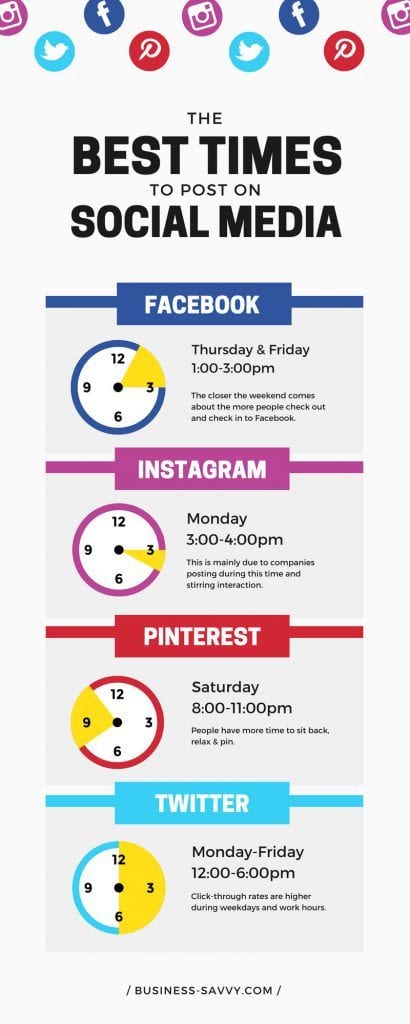
Obviously that depends on several factors:
– The social platform you are going to post on
– Your time zone or that of your target audience
– The age group of your target audience
– The day of the week
– The product or service you are offering
– and that’s not all…
… in other words, know your audience!
A picture is worth a thousand words
Include an image related to your post. People are becoming more and more visually orientated and will skip your message if you did not upload an image. First of all, your image must be sharp and crisp.
Twitter used to have restrictions on the size of pictures you can upload, it is now not so much limited, but I still prefer the 2:1 ratio, 880 wide by 440 high. You can upload up to 4 images per Tweets, one will be selected as the main picture, and the other 3 will be shown smaller on the right side of the main image. This is useful if you are promoting a shop and want to show a few items.
Share and reTweet other peoples posts, they will love that and might remember you and return the favor.
Alternate your posts with links with other posts such as jokes, quotes, tips, cartoons, etc. and write your post in a friendly and happy, even funny manner. Furthermore, you can even add rather relevant emojis to add to the happy mood you are in (I hope), and again, while it attracts the attention, less is best.
If you wish to learn more about starting your own online business from home, click on the banner below …
You might also like to read the below articles that I have selected for you:
- How To Create A Niche Website ?
- Where To Find Ideas To Write About In A Blog
- Why Is Self Motivation Important – Believe In Yourself
And remember that you can subscribe to my newsletter so that you will be instantly notified by email when a new article is made available for you to read. Just follow this link ~~> Subscribe to my Newsletter!
Thanks for reading

I hope that this article will help you with a few tips on how and when to share on social media. If you have any tips on the subject we would love to hear from you. And, if you have any questions, please use the box below and I will respond as soon as possible. If you enjoyed this article please share it socially and leave a comment below, I will highly appreciate it!
I am a Premium Member of Wealthy Affiliate, where I have learned how to share my passions. I am inviting you to join my team and learn how to become successful in business and retire early. It is 100% FREE to join, learn and earn! Click the button below and I’ll see you on the other side.

Thank you for the GREAT post! I have bookmarked it for reference as I learn and grow with social media. I am signed up with all the sites you mention, but an not active in all of them yet. That will come with growth and practice.
Right now I’m still pretty new with social media, and am trying to overcome an aversion that I have for most of the sites. I feel that most of the stuff posted is a waste of time and isn’t particularly relevant to anything but the poster. It’s something I have to get over. Have you any tips to overcome my natural dislike of social media?
Thanks for sharing your views on social media Grant. I quite agree with what you are saying and you might be interested in reading a short blog post that I have recently written on Wealthy Affiliate. It is titled “Do you know how to measure your social media marketing success?“, it explains how responsible social media marketers are moving towards a new breed of marketers called “Influencers”, which relates more to what you see yourself as.
Please do share your questions here Grant, and I wish you the very best for your online venture.
John ツ
Thanks for sharing this very valuable information. I will certainly be using this as a reference. I have bookmarked and highlighted the info that really stands out for me ( which is mostly the whole article lol).
What do recommend to be the best time to post on social media. I have noticed that I get emails from sites that I’m subscribed to, fairly early in the morning.
Looking forward to hearing from you.
Thanks for visiting my website David. I look forward to seeing you here often as I have many interesting articles up my sleeve, so stay tuned.
The best time of day to post on social media depends on many factors:
– The social platform you plan to use
– Your location
– Your target audience
– The day of the week
– The product or service you are offering
– and that’s not all…
To give you a clearer idea, here is the link to a blog articles which is quite interesting: https://blog.hubspot.com/marketing/best-times-post-pin-tweet-social-media-infographic, ready to be surprised?
Hope this helps.
I wish you an awesome ‘wealth building’ day!
John ツ
Knowing thr right way to leverage all o these that have been made available to us here is really good. I value all that AHS been shared and to be honest, they can make the real difference. Thank you so much for all that you share here on how to use social media the right way. It can be easier but it all just have to get started with a step. Thanks
Thanks for sharing your views on my latest tutorial Darmi. I hope that you enjoyed it and that you will make good use of the suggestions put forward.
I wish you the very best for your online project and I look forward to seeing you on my blog again soon for some more exciting tutorials.
Take care, stay safe and healthy!
John
You have just made my day! Seriously, this is exactly the type of material I needed today. I’ll be printing it out and posting by my desk.
You see, I am an affiliate marketer but my weakest point is that of social media. It’s my least favorite part of this business and so often gets left by the wayside.
Your post has given me the inspiration to prioritize social media, beginning this week. Thanks!
Well done for making it a goal Diane. Indeed, social sharing is most often than not an underestimated part of our marketing. Many people, especially newbies, seem to be afraid of the term “Social Media Marketing” and yet it is nothing more than sharing something of interest with friends, fans and followers.
So, I am glad that you have taken the decision to dive into it … like “this week“! Let me know how it goes, okay?
I wish you the very best Diane.
Stay safe and healthy.
John